

Import Recipes from Any Website/Blog

We have tried to make importing recipes from the web extremely easy. Currently you can import recipes by searching directly from Plan to Eat, copying-and-pasting a recipe’s URL, or using our import bookmarklet while browsing the web. However there are some sites, especially blogs, where importing recipes can be a bit of a pain — until today!

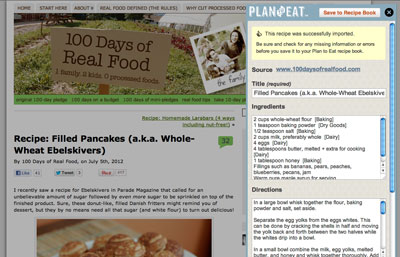
If  you are not already using our bookmarklet to import recipes into your Plan to Eat recipe book, now is definitely the time to take it for a spin. We’ve just updated our bookmarklet so you can import a recipe from any website without ever leaving that website. And if we can’t automatically import the recipe,  you can quickly copy-and-paste any missing information and easily save the recipe to your Plan to Eat account without leaving the page.

Here is how it works:

  1. Drag this link, Save Recipe (PTE) to your browser’s bookmark toolbar. If you are using Internet Explorer — try Google Chrome — right click the link and select “Add to Favorites…” and then save it to your Favorites/Favorites Bar. If the link above doesn’t work, you can also find the bookmarklet when adding a new recipe to Plan to Eat.
  2. The next time you find a recipe on the web that you want to save to your Plan to Eat recipe book, click this bookmark in your browser toolbar and it will display an import window with the recipe automatically imported. If we are unable to automatically import the recipe you can easily copy-and-paste from the recipe to the import window.
  3. When you’re ready to save the recipe to your Plan to Eat recipe book, click the “Save to my recipe book” button.

Note: If you are already using the old import bookmarklet, you’ll need to re-save the bookmarklet to your favorites/bookmarks bar. The good news is that this should be the last time you need to do this, even as we make updates on our end.

As always, let us know what you think!

27 Responses to Import Recipes from Any Website/Blog

  1. This sounds like great news, but I have tried it on three different recipes in three different blogs, and it isn’t working for me. I am in the most current Firefox. I does open the window so that I can cut and paste, which is handy.

    • I’m having the same problem with Mozilla Firefox :( I love that you guys did this, but it seems more tweaking is needed.

      • The new bookmarklet makes it much easier to copy-and-paste recipes from blogs directly to your Plan to Eat recipe book. However it does not improve our ability to automatically import recipes from blogs because of the inconstant formatting each blog uses for their recipes.

  2. Yay! This makes me happy. I’ve been using Plan to Eat for two weeks and we LOVE it! I see stuff on blogs all the time that I would like to make, but I either forget, or print it and file it away. Being able to save from anywhere now is like a cherry on top! Thanks for adding sanity to my family life!

  3. Brilliant. I love it! Unfortunately, the ingredients aren’t showing up my PTE recipes once I’ve copied and pasted the recipe. The notes, the directions and everything else seems to make it just fine, but not the ingredients.

  4. This new bookmarklet is exactly what I have wanted from your application — I get many many recipes from web pages and it was mildly cumbersome to do a manual import — this works perfectly. thanks.

  5. Great feature! I have had trouble with it though if I am not already logged in.
    I am using latest IE Explorer. If I am not logged in, it brings in the log in screen, but each time I log in, it just brings me back to log in again.
    If I go in to the site, log in and return to the recipe and use the bookmarklet, it works.
    Love it, though!

  6. I’m using Chrome. When I drag the link to my toolbar.. nothing happens. I would love to use this!!! Is there another way to go about it??
    Thanks!

    • I hope I can help. I’m assuming you have tried to click and drag the bookmark to your bookmark bar? Are you able to drag other links to your bookmark bar? Are you dragging the bookmark from the blog post or the PTE website? At what point are you stuck?

  7. Too bad I can’t seem to get any of my recipes from Atkins website to transfer over. So, copy and paste, I must… Please see if you can fix this… it would save TONS of my time.

  8. I am trying to get recipes from http://jointhereboot.com/ but none are transferring over using the bookmarklet. I will have to copy and paste as well. Adding my voice to the chorus here… Please, please, it would be so awesome to have this fixed! And thank you for working on this, it’s greatly appreciated.

    • Hi April, I’m sorry but jointhereboot.com is not a site that we can automatically import from because of their recipes format. However with the bookmarklet it should take less than a minute to import any recipes you like.

  9. Do you have the code for the bookmarklet anywhere for us to access? I recently started using pinterest and was able to install their bookmarklet in my safari bookmarks on my iPhone. Now that I understand the process, I think I could do it with p2e, but I can’t find the longhand version of the code.

    • Is this what you are looking for?

      javascript:function irtpte(){var baseUrl=’//www.plantoeat.com’,d=document,head=document.getElementsByTagName(‘head’)[0],s=d.createElement(‘scr’+'ipt’),b=d.body,l=d.location;try{if(typeof myBookmark===’undefined’){s.type=’text/javascript’;s.src=l.protocol+baseUrl+’/javascripts/pte-bookmarklet-import.min.js?’+new Date().getTime();b.appendChild(s);}else{myBookmark.run();}}catch(e){location.href=l.protocol+baseUrl+’/recipes/new?website_link=’+encodeURIComponent(l.href);}};irtpte();void(0)

  10. Sadly, this is not working for me at all on sites where I have to copy-paste the recipe information. Most often, when I get the message that it cannot auto-import the recipe, the “ingredient” and “direction” entry boxes are missing – the only place to enter info is under “description”. The “Save to Recipe Book” button at the bottom is also missing, and the one at the top doesn’t work. The X to close the window only works sometimes; I usually have to reload the page to get rid of it and try again. And I can only copy-paste from the recipe page once; after I have clicked on the PTE popout, the original page becomes completely unclickable until I get rid of the popout somehow.

    I’m using Firefox 7.0.1 on a Windows XP SP3 OS. Until this is fixed, can we please have a link to the old bookmarklet as an option? I dearly wish I had tested the new one before deleting the old one…